It is ten o’clock on the last working day of the month. Someone runs an update script against the live database instead of the test copy, and a few seconds later every customer balance reads zero. Two questions follow: how much data have we lost, and when can people get back to work? Ask them about your own databases. If nobody can answer with confidence, that is the gap this article covers.
Azure SQL Database protects your data without being asked, which is why many teams have never looked closely at what it covers and what it leaves to you. Think of the spare tyre in the boot of your car. Almost everyone has one, but fewer have checked its pressure, found the locking wheel nut key or changed a wheel at the roadside in the rain.
Every disaster recovery plan rests on two figures. The recovery point objective (RPO) is how much data you can afford to lose, measured in time. If the database fails at 10:00, can you go back to 09:55, or must it be 09:00? The recovery time objective (RTO) is how long you can be without the system before the damage becomes serious.
These are business decisions, not technical settings. A reporting warehouse that is rebuilt overnight may cope with losing a day and being offline for a morning. An order-processing or ledger database may not tolerate more than a few minutes of either. Each system needs its own answer, and the cost of protection rises steeply as the numbers shrink.
Partly. Azure SQL Database takes full, differential and transaction log backups automatically, so you can restore a database to a chosen point in time within its retention period. That period is seven days by default and can be extended to 35 (Basic tier databases are limited to seven). Long-term retention can keep weekly, monthly or yearly backups for up to ten years, but only if you switch it on. New databases store their backups in geo-redundant storage by default, which allows a restore into another Azure region.
The platform cannot decide what your business needs, and some gaps only show up on the day:
A point-in-time restore creates a new database alongside the original. Someone has to know how to swap it in and repoint the applications and reports that use it.
Restore time depends on the size and activity of the database, so a large database can take hours to come back.
If backup storage was set to locally or zone-redundant to save money, restoring into another region is not available.
Logins, firewall rules, connection strings, scheduled jobs and the applications on top all sit outside the database, and all need to work again before anyone can do their job.
Microsoft routinely tests that its automated backups can be restored. Checking that your applications, permissions and people can cope with that restore is down to you.
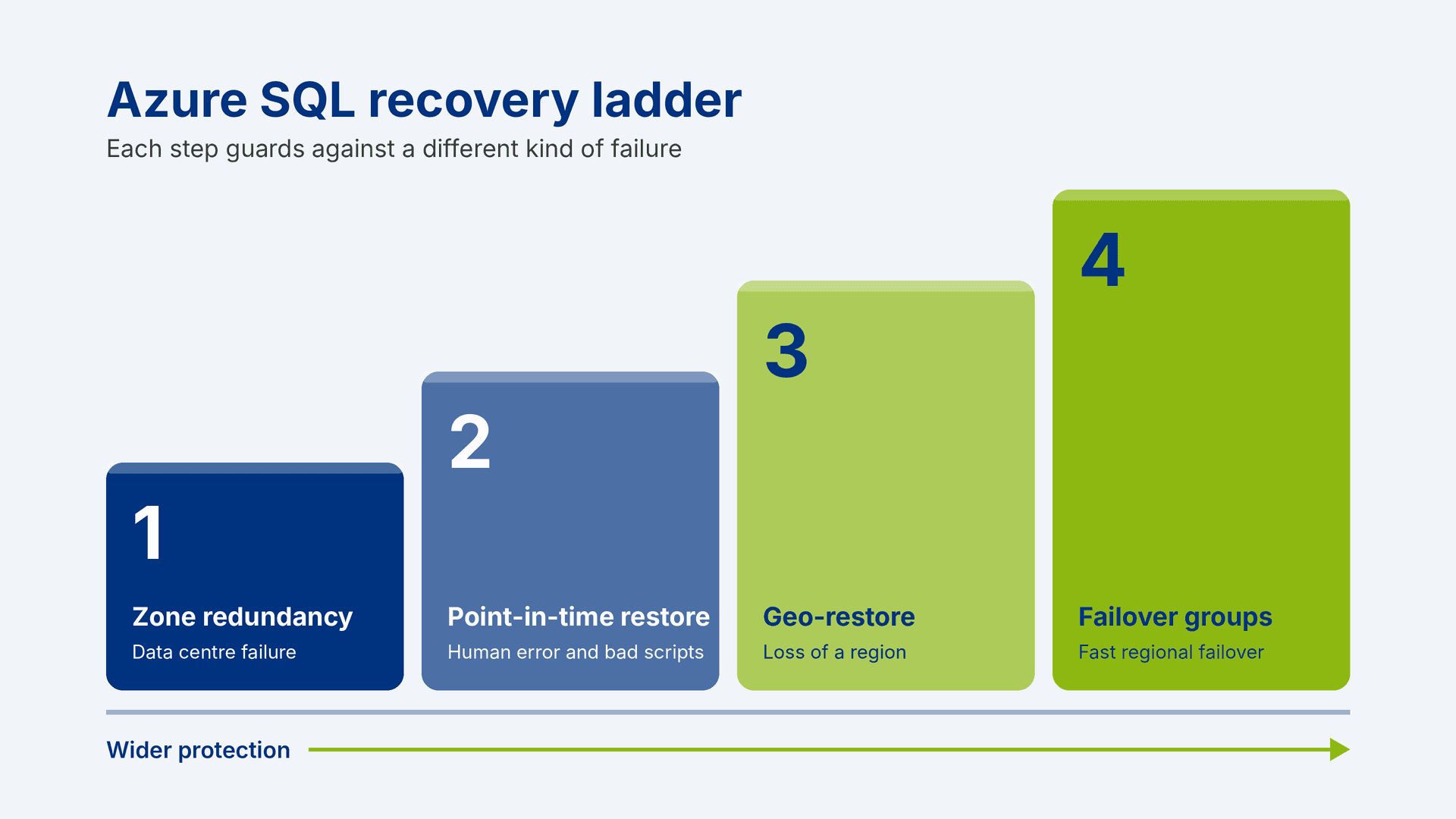
Azure SQL offers several layers of protection, and each guards against a different kind of failure. Most organisations need a combination. The cost generally rises as the protection widens, so check current pricing for your service tier before you decide.
Option | Protects against | Typical downtime | Typical data loss |
Zone redundancy | Loss of a data centre (availability zone) within a region | Under 30 seconds | None |
Point-in-time restore | Human error, bad scripts, corruption | Minutes to hours, depending on size | Back to the chosen moment |
Geo-restore | Loss of an entire Azure region | Minutes to hours | Minutes to an hour or so |
Failover groups or active geo-replication | Loss of an entire Azure region | Typically under a minute once failover starts | Typically seconds |
Figures are typical values published by Microsoft and vary with database size, workload and configuration.
Failover groups keep a continuously synchronised copy of your database in a second region and give applications connection endpoints that stay the same after a failover, so nobody has to edit connection strings in a crisis. If the secondary copy exists only for recovery, a standby replica can reduce the licensing cost. This applies to vCore databases in the General Purpose and Business Critical tiers, and the replica cannot be used for anything else.
A replica copies everything faithfully, including the mistake. If that update script zeroes your balances, the secondary in the other region is zeroed seconds later. Replication protects you from losing a region; only point-in-time restore protects you from yourselves. Critical databases usually need both, and the restore needs rehearsing.
If your reports run through Microsoft Fabric, the same logic applies. Mirroring can keep a copy of an Azure SQL database in OneLake for reporting, but the copy follows the source, mistakes included, so it is not a backup. The reports can only be as available as the database behind them.
Most teams know they should test their recovery plan, yet it tends to slip. Testing feels risky on a live system, and nobody clearly owns it. The business is reluctant to spare the time while everything seems fine.
An untested plan is a set of assumptions. A first real test often finds that the runbook is out of date, or that the only person with the right permissions is on leave. A restore that everyone expected to take an hour may take six. Put a restore drill in the diary this quarter, run it on a quiet afternoon and record how long it takes.
We have covered the practical detail in two separate articles that are coming soon, so this one does not repeat it.
Set recovery objectives your Azure SQL Database can meet covers agreeing RPO and RTO with the business and matching each database to the right protection at a sensible cost.
Test Azure SQL disaster recovery before you need it covers restore drills, failover rehearsals and the evidence auditors ask for.
If you have recently moved important logic out of spreadsheets and into a database, as described in our article on how to
move ledgers from Excel and VBA to Azure SQL, the next question is how quickly you could get it back after a failure.
Good disaster recovery needs people who understand both the database platform and the business teams who would feel an outage. PTR has been a family business since 1989, working with data and teaching others to use it. We are a Microsoft Solutions Partner for AI & Azure Data, we are vendor independent, and much of our work comes from customers who return to us.
Our approach combines
Microsoft Azure consultancy and
Azure SQL Database Admin training, so the people who design your recovery plan also help your team learn to run it. Our three-day Azure SQL Database Admin course is delivered virtually, and we can tailor training around your own recovery runbook. We also hold Cyber Essentials certification, which matters when the data is sensitive.
Talk to one of our consultants about how your Azure SQL databases are protected today. We will tell you where we see the biggest gaps and suggest a sensible first step. Call 0118 979 4000 or email
info@ptr.co.uk, or visit our
Microsoft Azure consultancy page.